Docker入门以及容器安装

安装Docker [已验证]

CentOS7安装Docker

Windos直接下一步下一步就行

1
Docker Desktop Installer.exe install --installation-dir="D:\Docker\install"

运行 MySQL

4799
1
2
3
docker run --name mysql-8.0.24 -p 3310:3306 --network nq -e MYSQL_ROOT_PASSWORD=password -e TZ=Asia/Shanghai -v /data/mysql-8.0.24/:/var/lib/mysql/ --restart=always -d mysql:8.0.24 --lower-case-table-names=1 --default-authentication-plugin=mysql_native_password
docker run --name mysql-8.0.24 -p 3310:3306 --network nq -e MYSQL_ROOT_PASSWORD=password -e TZ=Asia/Shanghai -v /data/mysql-8.0.24/data/:/var/lib/mysql/ -v /data/mysql-8.0.24/conf/:/etc/mysql/ -v /data/mysql-8.0.24-1/mysql-files:/var/lib/mysql-files --restart=always -d mysql:8.0.24 --lower-case-table-names=2 --default-authentication-plugin=mysql_native_password
docker run --name mysql-8.0.24 -p 3310:3306 --network nq -e MYSQL_ROOT_PASSWORD=password -e MYSQL_PASSWORD=jinghuo@MSQ2024 -e TZ=Asia/Shanghai -v /data/mysql-8.0.24/data/:/var/lib/mysql/ -v /data/mysql-8.0.24/conf/:/etc/mysql/ --restart=always -d mysql:8.0.24 --lower-case-table-names=2 --default-authentication-plugin=mysql_native_password
1
docker run --name mysql-8.0.24 -p 3310:3306 -e MYSQL_ROOT_PASSWORD=password -d mysql:8.0.24
1
docker run --name mysql-8.0.24-slave-3 -p 3322:3306 -e MYSQL_ROOT_PASSWORD=password -e TZ=Asia/Shanghai -v E:/Docker/mysql/mysql-8.0.24-slave-3/data/:/var/lib/mysql/ -v E:/Docker/mysql/mysql-8.0.24-slave-3/conf/:/etc/mysql/conf.d/ -d mysql:8.0.24 --lower-case-table-names=1 --default-authentication-plugin=mysql_native_password
1
2
3
4
5
6
docker exec -it mysql-8.0.24 bash
/usr/bin/mysql -uroot -p
use mysql;
select user,host from user;
ALTER USER 'root'@'%' IDENTIFIED WITH mysql_native_password BY "your_password";
flush privileges;
已root用户进入容器14c
1
docker exec -it -u root 14c bash
1
default-time-zone=+08:00

安装可视化工具 portainer

1
docker run -d -p 4399:9000 --restart=always -v /var/run/docker.sock:/var/run/docker.sock --name portainer portainer/portainer-ce:linux-arm64

安装 Jenkins-2.32.2

1
docker pull jenkins:2.32.2

解决启动报错

1
2
touch: cannot touch '/var/jenkins_home/copy_reference_file.log': Permission denied
Can not write to /var/jenkins_home/copy_reference_file.log. Wrong volume permissions?
1
chown -R 1000:1000 /config/jenkins_docker/
1
docker run -di --name=jenkins -p 1425:8080 -v /config/jenkins_docker/:/var/jenkins_home jenkins:2.32.2
1
docker exec -it jeninks-2.32.2 bash;/var/jenkins_home jenkins:2.32.2

开启远程连接

1
2
原:ExecStart=/usr/bin/dockerd -H fd:// --containerd=/run/containerd/containerd.sock
改:ExecStart=/usr/bin/dockerd -H fd:// --containerd=/run/containerd/containerd.sock -H tcp://0.0.0.0:2375
1
2
systemctl daemon-reload
systemctl restart docker

安装 XXL-Job

1
docker pull xuxueli/xxl-job-admin:2.3.0
1
docker run --name xxl-job-admin -p 8086:8086 -e PARAMS="--server.port=8086 --spring.datasource.url=jdbc:mysql://47.99.143.64:3310/xxl_job?Unicode=true&characterEncoding=UTF-8 --spring.datasource.username=root --spring.datasource.password=password" -v E:/Docker/xxl-job-2.3.0/logs:/data/applogs --privileged=true -d xuxueli/xxl-job-admin:2.3.0

安装 Nginx

1
docker pull nginx
1
2
3
docker run --name nginx -p 80:80 -p 443:443 -v /data/nginx/conf/nginx.conf:/etc/nginx/nginx.conf -v /data/nginx/logs/:/var/log/nginx/ -v /data/nginx/logs/error.log:/etc/nginx/logs/error.log -v /data/nginx/www/:/data/nginx/www/ --privileged=true -d nginx:latest

docker run --name nginx -p 80:80 -p 443:443 -v /data/nginx/conf/nginx.conf:/etc/nginx/nginx.conf -v /data/nginx/ssl/:/etc/nginx/ssl/ -v /data/nginx/logs/:/var/log/nginx/ -v /data/nginx/logs/error.log:/etc/nginx/logs/error.log -v /data/nginx/www/:/data/nginx/www/ -v /data/upload/:/data/upload/ --privileged=true -d nginx:1.23.2
1
docker run --name nginx -p 80:80 -p 443:443 -v E:/Docker/nginx/conf/nginx.conf:/etc/nginx/nginx.conf -v E:/Docker/nginx/logs/:/var/log/nginx/ -v E:/Docker/nginx/logs/error.log:/etc/nginx/logs/error.log -v E:/Docker/nginx/www/:/data/www/ --privileged=true -d nginx:latest

部署 springboot

1
2
3
4
5
6
7
8
9
10
11
12
13
FROM openjdk:8

#创建一个目录存放jar包
RUN mkdir -p /data/java/jian-shi

EXPOSE 8088
ADD ./jian-shi-java-2022.9.14.jar /data/java/jian-shi/jian-shi.jar

WORKDIR /data/java/jian-shi

RUN bash -c 'touch /data/java/jian-shi/jian-shi.jar'

ENTRYPOINT ["java","-Djava.security.egd=file:/dev/./urandom","-jar","/data/java/jian-shi/jian-shi.jar"]
1
docker build -t jian-shi:2023.2.2 .
1
docker images
1
docker run -p 8088:8088 --name jian-shi-2022.9.14 -v /data/upload:/data/upload -v /data/temp:/data/temp -d jian-shi:2023.2.2

kibana-7.8.0

1
docker pull kibana:7.8.0
1
2
3
4
5
docker run  --name kibana-7.8.0 --restart always -p 5601:5601 -v E:/Docker/kibana-7.8.0/config/kibana.yml:/usr/share/kibana/config/kibana.yml -d kibana:7.8.0

docker run --name kibana-7.8.0-remote --restart always -p 5602:5601 -v E:/Docker/kibana-7.8.0-47.99.143.64/config/kibana.yml:/usr/share/kibana/config/kibana.yml -d kibana:7.8.0

docker run --name kibana-7.8.0 --restart always -p 5601:5601 -v /data/kibana/config/kibana.yml:/usr/share/kibana/config/kibana.yml -d kibana:7.8.0
1
2
3
4
5
6
7
8
9
server.name: kibana-7.8.0
server.host: "0"
elasticsearch.hosts: ["http://47.99.143.64:9200"]
xpack.monitoring.ui.container.elasticsearch.enabled: true
#设置kibana中文显示
i18n.locale: zh-CN

elasticsearch.username: elastic
elasticsearch.password: password
1
docker pull mobz/elasticsearch-head:5
1
docker run --restart always --name elasticsearch-head-5 -p 9100:9100 -d mobz/elasticsearch-head:5
1
2
3
4
5
6
7
8
找到容器中的文件【/usr/src/app/_site/vendor.js】6886行修改
1.将【/usr/src/app】整个文件夹复制出来
docker cp b1c:/usr/src/app/ ./
2.修改文件【/_site/vendor.js】,具体修改如下
原:contentType: "application/x-www-form-urlencoded"
改:contentType: "application/json;charset=UTF-8"
3.修改完成后将文件夹复制到容器中
docker cp ./ b1c:/usr/src/app/

Logstash-7.8.0

1
docker pull logstash:7.8.0
1
2
3
4
5
docker run --name logstash-7.8.0-remote -p 5045:5044 -v E:/Docker/logstash-7.8.0-47.99.143.64/config/:/usr/share/logstash/config/ -v E:/Docker/logstash-7.8.0-47.99.143.64/data/:/usr/share/logstash/data/ -d logstash:7.8.0

docker run --name logstash-7.8.0 -p 5044:5044 -v E:/Docker/logstash-7.8.0/config/:/usr/share/logstash/config/ -v E:/Docker/logstash-7.8.0/data/:/usr/share/logstash/data/ -d logstash:7.8.0

docker run --name logstash-8.4.0 -p 5044:5044 -v E:/Docker/logstash-8.4.0/config/:/usr/share/logstash/config/ -v E:/Docker/logstash-8.4.0/data/:/usr/share/logstash/data/ -v E:/Docker/logstash-8.4.0/pipeline/:/usr/share/logstash/pipeline/ -d logstash:8.4.0
1
2
Xmx256m
Xms256m
1
2
3
4
5
6
7
8
9
10
11
12
13
14
15
16
17
18
19
20
21
22
23
24
25
26
27
28
29
30
31
32
33
34
35
36
37
38
39
40
41
42
43
44
45
46
47
input{
jdbc {
jdbc_driver_library => "/usr/share/logstash/config/mysql-connector-java-8.0.30.jar"
jdbc_driver_class => "com.mysql.cj.jdbc.Driver"
jdbc_connection_string => "jdbc:mysql://47.99.123.15:3310/jian-shi-test?serverTimezone=Asia/Shanghai&useUnicode=true&characterEncoding=UTF-8&nullCatalogMeansCurrent=true&useSSL=false&useAffectedRows=true&autoReconnect=true&connectTimeout=60000&socketTimeout=60000"
jdbc_user => "root"
jdbc_password => "123456"
jdbc_paging_enabled => true
jdbc_page_size => "10000"
jdbc_default_timezone =>"Asia/Shanghai"
# 开启记录最后一次运行的结果
record_last_run => true
# 设置可以字段追踪
use_column_value => true
# 追踪字段的类型,目前只有数字(numeric)和时间类型(timestamp),默认是数字类型
tracking_column_type => "numeric"
#设置监听间隔 各字段含义(从左至右)分、时、天、月、年,全为*默认含义为每分钟都更新
schedule => "* * * * *"
statement => "select * from `book`"
#statement_filepath => "mysql.sql"
tracking_column => "create_time"
last_run_metadata_path => "./logstash_jdbc_last_run"
}
}
filter {
json {
source => "message"
remove_field => ["message"]
}
date {
match => ["timestamp","yyyy/dd/MM HH:mm:ss Z"]
}
}
output{
elasticsearch {
hosts => "192.168.2.8:9200"
user => "elastic"
password => "password"
index => "books"
document_id => "%{id}"
# template_overwrite => true
# template => "/usr/share/logstash/config/logstash.json"
}
stdout {
codec => json_lines
}
}
1
2
3
4
5
6
7
8
9
10
11
12
13
14
15
16
17
18
http.host: 0.0.0.0
xpack.monitoring.elasticsearch.hosts: ["http://192.168.2.8:9200"]
xpack.monitoring.enabled: true
xpack.monitoring.elasticsearch.username: elastic
xpack.monitoring.elasticsearch.password: password

path.config: /usr/share/logstash/config/*.conf
path.logs: /usr/share/logstash/logs

# 重新加载配置文件间隔
config.reload.interval: 60s

# debug模式 开启后会打印解析后的配置文件 包括密码等信息 慎用
# 需要同时配置日志等级为debug
config.debug: true

# 验证配置文件及存在性
config.test_and_exit: false
1
2
pipeline.id: main
path.config: ./logstash.conf

人大金仓

1
docker run -d -it --privileged=true -p 54321:54321 -v E:/Docker/kingbase/opt:/opt --name kingbase-v1 godmeowicesun/kingbase:latest

Neo4J

1
docker pull neo4j:3.5.8
1
docker run --name neo4j-3.5.8 -p 7474:7474 -p 7687:7687 -v E:/Docker/neo4j-3.5.8/config/:/var/lib/neo4j/conf/ -v E:/Docker/neo4j-3.5.8/data/:/var/lib/neo4j/data/ -v E:/Docker/neo4j-3.5.8/logs/:/logs/ -v E:/Docker/neo4j-3.5.8/plugins/:/plugins/ -v E:/Docker/neo4j-3.5.8/import/:/import/ --env NEO4J_AUTH=neo4j/password -d neo4j:3.5.8

如果报错可能是配置文件的问题,照着下面的替换就好了,另外修改密码需要将[/var/lib/neo4j/data/dbms]文件夹删除否则不会生效的

1
2
3
4
5
6
7
8
9
10
11
12
13
14
15
16
17
18
19
20
21
22
23
24
25
26
27
28
29
30
31
32
33
34
35
36
37
38
39
40
41
42
43
44
45
46
47
48
49
50
51
52
53
54
55
56
57
58
59
60
61
62
63
64
65
66
67
68
69
70
71
72
73
74
75
76
77
78
79
80
81
82
83
84
85
86
87
88
89
90
91
92
93
94
95
96
97
98
99
100
101
102
103
104
105
106
107
108
109
110
111
112
113
114
115
116
117
118
119
120
121
122
123
124
125
126
127
128
129
130
131
132
133
134
135
136
137
138
139
140
141
142
143
144
145
146
147
148
149
150
151
152
153
154
155
156
157
158
159
160
161
162
163
164
165
166
167
168
169
170
171
172
173
174
175
176
177
178
179
180
181
182
183
184
185
186
187
188
189
190
191
192
193
194
195
196
197
198
199
200
201
202
203
204
205
206
207
208
209
210
211
212
213
214
215
216
217
218
219
220
221
222
223
224
225
226
227
228
229
230
231
232
233
234
235
236
237
238
239
240
241
242
243
244
245
246
247
248
249
250
251
252
253
254
255
256
257
258
259
260
261
262
263
264
265
266
267
268
269
270
271
272
273
274
275
276
277
278
279
280
281
282
283
284
285
286
287
288
289
290
291
292
293
294
295
296
297
298
299
300
301
302
303
304
305
306
307
308
309
310
311
312
313
314
315
316
317
318
319
320
321
322
323
324
325
326
327
328
329
330
331
332
333
334
335
336
337
338
339
340
341
342
343
344
345
346
347
348
349
#*****************************************************************
# Neo4j configuration
#
# For more details and a complete list of settings, please see
# https://neo4j.com/docs/operations-manual/current/reference/configuration-settings/
#*****************************************************************

# The name of the database to mount
dbms.active_database=graph.db

# Paths of directories in the installation.
#dbms.directories.data=data
#dbms.directories.plugins=plugins
#dbms.directories.certificates=certificates
#dbms.directories.logs=logs
#dbms.directories.lib=lib
#dbms.directories.run=run

# This setting constrains all `LOAD CSV` import files to be under the `import` directory. Remove or comment it out to
# allow files to be loaded from anywhere in the filesystem; this introduces possible security problems. See the
# `LOAD CSV` section of the manual for details.
#dbms.directories.import=import

# Whether requests to Neo4j are authenticated.
# To disable authentication, uncomment this line
dbms.security.auth_enabled=true

# Enable this to be able to upgrade a store from an older version.
#dbms.allow_upgrade=true

# Java Heap Size: by default the Java heap size is dynamically
# calculated based on available system resources.
# Uncomment these lines to set specific initial and maximum
# heap size.
dbms.memory.heap.initial_size=5g
dbms.memory.heap.max_size=10g

# The amount of memory to use for mapping the store files, in bytes (or
# kilobytes with the 'k' suffix, megabytes with 'm' and gigabytes with 'g').
# If Neo4j is running on a dedicated server, then it is generally recommended
# to leave about 2-4 gigabytes for the operating system, give the JVM enough
# heap to hold all your transaction state and query context, and then leave the
# rest for the page cache.
# The default page cache memory assumes the machine is dedicated to running
# Neo4j, and is heuristically set to 50% of RAM minus the max Java heap size.

#*****************************************************************
# Network connector configuration
#*****************************************************************

# With default configuration Neo4j only accepts local connections.
# To accept non-local connections, uncomment this line:

# You can also choose a specific network interface, and configure a non-default
# port for each connector, by setting their individual listen_address.

# The address at which this server can be reached by its clients. This may be the server's IP address or DNS name, or
# it may be the address of a reverse proxy which sits in front of the server. This setting may be overridden for
# individual connectors below.
#dbms.connectors.default_advertised_address=172.18.12.2
dbms.connectors.bolt.advertised_address=172.18.12.2

# You can also choose a specific advertised hostname or IP address, and
# configure an advertised port for each connector, by setting their
# individual advertised_address.

# Bolt connector
dbms.connector.bolt.enabled=true
#dbms.connector.bolt.tls_level=OPTIONAL

# HTTP Connector. There must be exactly one HTTP connector.
dbms.connector.http.enabled=true

# HTTPS Connector. There can be zero or one HTTPS connectors.
dbms.connector.https.enabled=true

# Number of Neo4j worker threads.
#dbms.threads.worker_count=

#*****************************************************************
# SSL system configuration
#*****************************************************************

# Names of the SSL policies to be used for the respective components.

# The legacy policy is a special policy which is not defined in
# the policy configuration section, but rather derives from
# dbms.directories.certificates and associated files
# (by default: neo4j.key and neo4j.cert). Its use will be deprecated.

# The policies to be used for connectors.
#
# N.B: Note that a connector must be configured to support/require
# SSL/TLS for the policy to actually be utilized.
#
# see: dbms.connector.*.tls_level

#bolt.ssl_policy=legacy
#https.ssl_policy=legacy

#*****************************************************************
# SSL policy configuration
#*****************************************************************

# Each policy is configured under a separate namespace, e.g.
# dbms.ssl.policy.<policyname>.*
#
# The example settings below are for a new policy named 'default'.

# The base directory for cryptographic objects. Each policy will by
# default look for its associated objects (keys, certificates, ...)
# under the base directory.
#
# Every such setting can be overriden using a full path to
# the respective object, but every policy will by default look
# for cryptographic objects in its base location.
#
# Mandatory setting

#dbms.ssl.policy.default.base_directory=certificates/default

# Allows the generation of a fresh private key and a self-signed
# certificate if none are found in the expected locations. It is
# recommended to turn this off again after keys have been generated.
#
# Keys should in general be generated and distributed offline
# by a trusted certificate authority (CA) and not by utilizing
# this mode.

#dbms.ssl.policy.default.allow_key_generation=false

# Enabling this makes it so that this policy ignores the contents
# of the trusted_dir and simply resorts to trusting everything.
#
# Use of this mode is discouraged. It would offer encryption but no security.

#dbms.ssl.policy.default.trust_all=false

# The private key for the default SSL policy. By default a file
# named private.key is expected under the base directory of the policy.
# It is mandatory that a key can be found or generated.

#dbms.ssl.policy.default.private_key=

# The private key for the default SSL policy. By default a file
# named public.crt is expected under the base directory of the policy.
# It is mandatory that a certificate can be found or generated.

#dbms.ssl.policy.default.public_certificate=

# The certificates of trusted parties. By default a directory named
# 'trusted' is expected under the base directory of the policy. It is
# mandatory to create the directory so that it exists, because it cannot
# be auto-created (for security purposes).
#
# To enforce client authentication client_auth must be set to 'require'!

#dbms.ssl.policy.default.trusted_dir=

# Client authentication setting. Values: none, optional, require
# The default is to require client authentication.
#
# Servers are always authenticated unless explicitly overridden
# using the trust_all setting. In a mutual authentication setup this
# should be kept at the default of require and trusted certificates
# must be installed in the trusted_dir.

#dbms.ssl.policy.default.client_auth=require

# A comma-separated list of allowed TLS versions.
# By default only TLSv1.2 is allowed.

#dbms.ssl.policy.default.tls_versions=

# A comma-separated list of allowed ciphers.
# The default ciphers are the defaults of the JVM platform.

#dbms.ssl.policy.default.ciphers=

#*****************************************************************
# Logging configuration
#*****************************************************************

# To enable HTTP logging, uncomment this line
#dbms.logs.http.enabled=true

# Number of HTTP logs to keep.
#dbms.logs.http.rotation.keep_number=5

# Size of each HTTP log that is kept.
#dbms.logs.http.rotation.size=20m

# To enable GC Logging, uncomment this line
#dbms.logs.gc.enabled=true

# GC Logging Options
# see http://docs.oracle.com/cd/E19957-01/819-0084-10/pt_tuningjava.html#wp57013 for more information.
#dbms.logs.gc.options=-XX:+PrintGCDetails -XX:+PrintGCDateStamps -XX:+PrintGCApplicationStoppedTime -XX:+PrintPromotionFailure -XX:+PrintTenuringDistribution

# Number of GC logs to keep.
#dbms.logs.gc.rotation.keep_number=5

# Size of each GC log that is kept.
#dbms.logs.gc.rotation.size=20m

# Size threshold for rotation of the debug log. If set to zero then no rotation will occur. Accepts a binary suffix "k",
# "m" or "g".
#dbms.logs.debug.rotation.size=20m

# Maximum number of history files for the internal log.
#dbms.logs.debug.rotation.keep_number=7

#*****************************************************************
# Miscellaneous configuration
#*****************************************************************

# Enable this to specify a parser other than the default one.
#cypher.default_language_version=3.0

# Determines if Cypher will allow using file URLs when loading data using
# `LOAD CSV`. Setting this value to `false` will cause Neo4j to fail `LOAD CSV`
# clauses that load data from the file system.
dbms.security.allow_csv_import_from_file_urls=true


# Value of the Access-Control-Allow-Origin header sent over any HTTP or HTTPS
# connector. This defaults to '*', which allows broadest compatibility. Note
# that any URI provided here limits HTTP/HTTPS access to that URI only.
#dbms.security.http_access_control_allow_origin=*

# Value of the HTTP Strict-Transport-Security (HSTS) response header. This header
# tells browsers that a webpage should only be accessed using HTTPS instead of HTTP.
# It is attached to every HTTPS response. Setting is not set by default so
# 'Strict-Transport-Security' header is not sent. Value is expected to contain
# dirictives like 'max-age', 'includeSubDomains' and 'preload'.
#dbms.security.http_strict_transport_security=

# Retention policy for transaction logs needed to perform recovery and backups.

# Enable a remote shell server which Neo4j Shell clients can log in to.
dbms.shell.enabled=true
# The network interface IP the shell will listen on (use 0.0.0.0 for all interfaces).
dbms.shell.host=127.0.0.1
# The port the shell will listen on, default is 1337.
dbms.shell.port=1337

# Only allow read operations from this Neo4j instance. This mode still requires
# write access to the directory for lock purposes.
dbms.read_only=false

# Comma separated list of JAX-RS packages containing JAX-RS resources, one
# package name for each mountpoint. The listed package names will be loaded
# under the mountpoints specified. Uncomment this line to mount the
# org.neo4j.examples.server.unmanaged.HelloWorldResource.java from
# neo4j-server-examples under /examples/unmanaged, resulting in a final URL of
# http://localhost:7474/examples/unmanaged/helloworld/{nodeId}
#dbms.unmanaged_extension_classes=org.neo4j.examples.server.unmanaged=/examples/unmanaged

#********************************************************************
# JVM Parameters
#********************************************************************

# G1GC generally strikes a good balance between throughput and tail
# latency, without too much tuning.
dbms.jvm.additional=-XX:+UseG1GC

# Have common exceptions keep producing stack traces, so they can be
# debugged regardless of how often logs are rotated.
dbms.jvm.additional=-XX:-OmitStackTraceInFastThrow

# Make sure that `initmemory` is not only allocated, but committed to
# the process, before starting the database. This reduces memory
# fragmentation, increasing the effectiveness of transparent huge
# pages. It also reduces the possibility of seeing performance drop
# due to heap-growing GC events, where a decrease in available page
# cache leads to an increase in mean IO response time.
# Try reducing the heap memory, if this flag degrades performance.
dbms.jvm.additional=-XX:+AlwaysPreTouch

# Trust that non-static final fields are really final.
# This allows more optimizations and improves overall performance.
# NOTE: Disable this if you use embedded mode, or have extensions or dependencies that may use reflection or
# serialization to change the value of final fields!
dbms.jvm.additional=-XX:+UnlockExperimentalVMOptions
dbms.jvm.additional=-XX:+TrustFinalNonStaticFields

# Disable explicit garbage collection, which is occasionally invoked by the JDK itself.
dbms.jvm.additional=-XX:+DisableExplicitGC

# Remote JMX monitoring, uncomment and adjust the following lines as needed. Absolute paths to jmx.access and
# jmx.password files are required.
# Also make sure to update the jmx.access and jmx.password files with appropriate permission roles and passwords,
# the shipped configuration contains only a read only role called 'monitor' with password 'Neo4j'.
# For more details, see: http://download.oracle.com/javase/8/docs/technotes/guides/management/agent.html
# On Unix based systems the jmx.password file needs to be owned by the user that will run the server,
# and have permissions set to 0600.
# For details on setting these file permissions on Windows see:
# http://docs.oracle.com/javase/8/docs/technotes/guides/management/security-windows.html
#dbms.jvm.additional=-Dcom.sun.management.jmxremote.port=3637
#dbms.jvm.additional=-Dcom.sun.management.jmxremote.authenticate=true
#dbms.jvm.additional=-Dcom.sun.management.jmxremote.ssl=false
#dbms.jvm.additional=-Dcom.sun.management.jmxremote.password.file=/absolute/path/to/conf/jmx.password
#dbms.jvm.additional=-Dcom.sun.management.jmxremote.access.file=/absolute/path/to/conf/jmx.access

# Some systems cannot discover host name automatically, and need this line configured:
#dbms.jvm.additional=-Djava.rmi.server.hostname=$THE_NEO4J_SERVER_HOSTNAME

# Expand Diffie Hellman (DH) key size from default 1024 to 2048 for DH-RSA cipher suites used in server TLS handshakes.
# This is to protect the server from any potential passive eavesdropping.
dbms.jvm.additional=-Djdk.tls.ephemeralDHKeySize=2048

# This mitigates a DDoS vector.
dbms.jvm.additional=-Djdk.tls.rejectClientInitiatedRenegotiation=true

#********************************************************************
# Wrapper Windows NT/2000/XP Service Properties
#********************************************************************
# WARNING - Do not modify any of these properties when an application
# using this configuration file has been installed as a service.
# Please uninstall the service before modifying this section. The
# service can then be reinstalled.

# Name of the service
dbms.windows_service_name=neo4j
#********************************************************************
# Other Neo4j system properties
#********************************************************************
dbms.jvm.additional=-Dunsupported.dbms.udc.source=tarball
wrapper.java.additional=-Dneo4j.ext.udc.source=docker
ha.host.data=b1e64ff71d06:6001
ha.host.coordination=b1e64ff71d06:5001
dbms.tx_log.rotation.retention_policy=100M size
dbms.memory.pagecache.size=512M
dbms.directories.plugins=/plugins
dbms.directories.logs=/logs
dbms.directories.import=/import
dbms.connectors.default_listen_address=0.0.0.0
dbms.connector.https.listen_address=0.0.0.0:7473
dbms.connector.http.listen_address=0.0.0.0:7474
dbms.connector.bolt.listen_address=0.0.0.0:7687
causal_clustering.transaction_listen_address=0.0.0.0:6000
causal_clustering.transaction_advertised_address=b1e64ff71d06:6000
causal_clustering.raft_listen_address=0.0.0.0:7000
causal_clustering.raft_advertised_address=b1e64ff71d06:7000
causal_clustering.discovery_listen_address=0.0.0.0:5000
causal_clustering.discovery_advertised_address=b1e64ff71d06:5000
HOME=/var/lib/neo4j
EDITION=community

Nacos

1
docker pull nacos/nacos-server:v2.2.0
1
docker run -e MODE=standalone -e TIME_ZONE='Asia/Shanghai' -v E:/Docker/nacos-2.2.0/logs/:/home/nacos/logs/ -v E:/Docker/nacos-2.2.0/config/:/home/nacos/conf/ -p 8848:8848 --name nacos-2.2.0 --restart=always -d nacos/nacos-server:v2.2.0

安装Gitea

4799
1
docker run --env=PATH=/usr/local/sbin:/usr/local/bin:/usr/sbin:/usr/bin:/sbin:/bin --env=USER=git --env=GITEA_CUSTOM=/data/gitea -v /data/gitea-1.17.4/:/data/ -v /data -p 23:22 -p 81:3000  --runtime=runc -d gitea/gitea:1.17.4
1
2
3
4
5
docker run --name=gitea01 --env=PATH=/usr/local/sbin:/usr/local/bin:/usr/sbin:/usr/bin:/sbin:/bin --env=USER=git --env=GITEA_CUSTOM=/data/gitea --volume=E:/Docker/gitea-1.17.4/:/data/ --volume=/data -p 22:22 -p 80:3000 --runtime=runc -d gitea/gitea:1.17.4

docker run --env=PATH=/usr/local/sbin:/usr/local/bin:/usr/sbin:/usr/bin:/sbin:/bin --env=USER=git --env=GITEA_CUSTOM=/data/gitea --volume=/data/gitea-1.17.4/:/data/ --volume=/data -p 23:22 -p 81:3000 --runtime=runc -d gitea/gitea:1.17.4

docker run --name gitea-1.17.4 --env=PATH=/usr/local/sbin:/usr/local/bin:/usr/sbin:/usr/bin:/sbin:/bin --env=USER=git --env=GITEA_CUSTOM=/data/gitea -v E:/Docker/gitea-1.17.4/:/data/ -p 22:22 -p 80:3000 --runtime=runc -d gitea/gitea:1.17.4

安装flowable-ui

1
docker run -p 8090:8080 -d flowable/flowable-ui

安装MongoDB

1
docker run -itd --name mongo -v E:/Docker/mongodb-4.2/data/:/data/db/ -p 27017:27017 mongo:4.2 --auth

安装PostGis

1
docker pull postgis/postgis

redis

1
docker run -p 6379:6379 --name redis6 -v /data/redis/redis.conf:/etc/redis/redis.conf -v /data/redis/data:/var/lib/redis -v /data/redis/logs:/logs --network nq -d redis:6.2.6

安装MinIO

1
docker pull minio/minio:RELEASE.2023-01-18T04-36-38Z.hotfix.fff84de10
1
2
3
4
5
docker run -p 9000:9000 -p 9090:9090 --name minio-2022 -d minio/minio:RELEASE.2023-01-18T04-36-38Z.hotfix.fff84de10 -e MINIO_ACCESS_KEY=minio -e MINIO_SECRET_KEY=password -v E:/Docker/minio/data/:/data -v E:/Docker/minio/config/:/root/.minio minio/minio server /data --console-address ":9090" -address ":9000"

docker run -p 9000:9000 -p 9090:9090 --name minio-2022 -d minio/minio:RELEASE.2023-01-18T04-36-38Z.hotfix.fff84de10 -v E:/Docker/minio/data/:/data -v E:/Docker/minio/config/:/root/.minio minio/minio server /data --console-address ":9090" -address ":9000"

docker run -d -p 9000:9000 -p 9090:9090 --name minio -e "MINIO_ROOT_USER=minioadmin" -e "MINIO_ROOT_PASSWORD=minioadmin" -v E:/Docker/minio/data/:/data minio/minio:RELEASE.2023-01-18T04-36-38Z.hotfix.fff84de10 server /data --console-address ":9090" -address ":9000"

安装Home Assistant

1
docker run -d --name home-assistant -v E:/Docker/home_assistant/config/:/config/ -p 8123:8123 homeassistant/home-assistant:2023.5.3

安装ESP Home

1
docker run --name esp_home -p 6052:6052 -v E:/Docker/esp_home/config/:/config/ -v E:/Docker/esp_home/udev/:/run/udev/ -e USERNAME="admin" -e PASSWORD="password" -d esphome/esphome:2023.5

导出镜像

1
docker export -o redis-8.0.tar redis
1
docker save -o ./es.tar elasticsearch:7.17.8

导入镜像

1
docker load -i E:/Docker/images/es-7.17.8.tar

删除启动失败的容器

1
docker rm $(docker ps -qf status=exited)

重启 docker

1
systemctl daemon-reload && systemctl restart docker

删除容器

1
docker stop 容器名称/容器ID
1
2
docker rm 容器名称/容器ID
docker rmi 镜像名称/镜像ID

拷贝文件到容器

1
docker cp ./ 70:/config

删除镜像

1
docker rmi 镜像名称/镜像ID

修改容器名称

1
docker rename 原来名称 新名称

Docker容器开机自启

1
docker update --restart=always 容器名称/容器ID
1
--restart=always

Docker开机自启

Docker启动开机自启

1
systemctl enable docker.service

Docker关闭开机自启

1
systemctl disable docker.service

Docker关闭容器开机自启

1
docker update --restart=no 容器名称/容器ID
  • restart参数含义
1
2
3
4
5
6
7
8
9
10
11
12
13
	no
默认策略,在容器退出时不重启容器
on-failure
在容器非正常退出时(退出状态非0),才会重启容器
on-failure:3
在容器非正常退出时重启容器,最多重启3次
always
在容器退出时总是重启容器
#开机自启
unless-stopped
在容器退出时总是重启容器,但是不考虑在Docker守护进程启动时就已经停止了的容器
# 一般推荐使用always参数
--restart=always

Docker网络

1
docker network ls
1
docker network create --subnet 192.168.2.10/16 static
1
docker network rm 246

切换容器网络

【elastic】网络名称;【232】容器ID前三位
1
docker network connect elastic 232

解除容器绑定的网络

1
docker network disconnect elastic 232

Alist

1
docker run -d --restart=always -v E:/Docker/alist/:/opt/alist/data/ -p 5244:5244 -e PUID=0 -e PGID=0 -e UMASK=022 --name="alist" xhofe/alist:latest

禅道

1
docker run --name zentao1 -p 89:80 -v E:/Docker/zentao/zentaopms:/www/zentaopms -v E:/Docker/zentao/mysqldata:/var/lib/mysql -e MYSQL_ROOT_PASSWORD=nieqiang@01 -e MYSQL_HOST=192.168.2.8 -d 2bead

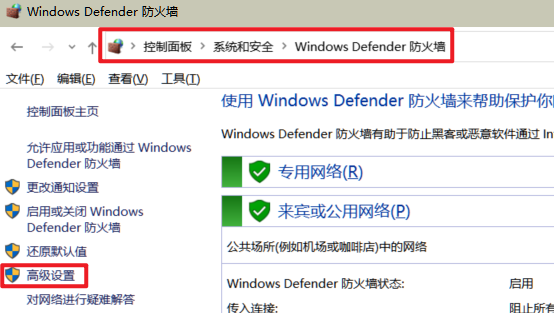
【Win10环境】Docker容器局域网可访问配置

  • 控制面板进入如下界面
    防火墙
  • 单击【入站规则】
  • 单击【新建规则】
  • 规则类型【程序】–>下一步
  • 程序【此程序路径】–>浏览–>[%ProgramFiles%\Docker\Docker\resources\com.docker.backend.exe]
  • 其他的都下一步,最后一步填写一个名称和描述就可以了

【Win10环境】Docker所有容器位置迁移

  • 1.退出Docker Desktop
  • 2.打开Win+R,输入cmd,打开命令提示符窗口。
  • 3.列出WSL的存储
1
wsl --list -v
  • 4.关闭WSL
1
wsl --shutdown
  • 5.创建你要存储的新位置文件夹,比如【E:\Repository\Docker\wsl\data】
  • 6.导出(备份)容器和它的数据。这一步的时长取决于ext4.vhdx文件的大小。
1
wsl --export docker-desktop-data "E:\Repository\Docker\docker-desktop-data.tar"
  • 7.从WSL注销容器数据,此步骤会自动删除原来存储位置的ext4.vhdx文件,此步骤不可省略,否则后面导入容器数据会失败
1
wsl --unregister docker-desktop-data
  • 8.从之前备份的位置导入容器数据到WSL,此步骤会自动从备份文件那创建ext4.vhdx文件
1
wsl --import docker-desktop-data "E:\Repository\Docker\wsl\data" "E:\Repository\Docker\docker-desktop-data.tar" --version 2
  • 9.重启Docker Desktop,完成了容器文件的存储位置迁移。

Docker单个容器迁移(包括数据和环境配置)

  • 容器保存为镜像
    1
    docker commit 容器名称/ID 镜像名称:版本
  • 镜像保存为本地文件
    1
    docker save -o 保存的名字.tar 镜像ID
  • 本地文件导入docker,镜像比较大可能会卡住不动,但是是正常的
    1
    docker load -i ./保存的名字.tar
  • 修改名称和tag
    1
    docker tag 镜像ID ocr:2024.8.1

安装禅道

1
docker run --env=MYSQL_ROOT_PASSWORD=nieqiang@01 --env=MYSQL_HOST=192.168.2.8 --env=PATH=/usr/local/sbin:/usr/local/bin:/usr/sbin:/usr/bin:/sbin:/bin --volume=E:/Docker/zentao-1/mysqldata:/var/lib/mysql --volume=E:/Docker/zentao-1/zentaopms:/www/zentaopms --volume=/data --workdir=/apps/zentao -p 88:80 --restart=no --runtime=runc --name=zentao-free -d 2be

docker-compose执行

1
2
docker-compose -p kong up -d
docker-compose -p smeart_library up -d

评论