Kibana入门

安装Elasticsearch请看Docker入门或者Elasticsearch安装

安装Kibana请看Docker入门

IK分词器安装请看Docker入门

入门使用kibana

分词
1
2
3
4
5
6
7
8
9
10
11
12
13
14
15
16
17
18
19
20
21
22
23
24
25
26
27
28
29
30
31
32
33
34
35
36
37
38
39
POST _analyze
{
"analyzer":"standard",
"text":"您好,聂强"
}

POST _analyze
{
"analyzer":"standard",
"text":"我是中国人"
}

POST _analyze
{
"analyzer":"ik_smart",
"text":"您好,我是聂强"
}

POST _analyze
{
"analyzer":"ik_max_word",
"text":"您好,我是聂强"
}

POST _analyze
{
"analyzer":"ik_smart",
"text":"我是中国人"
}

POST _analyze
{
"analyzer":"ik_max_word",
"text":"我是中国人"
}
# 查看节点
GET _cat/nodes?v
# 查看健康状态
GET _cat/health?v

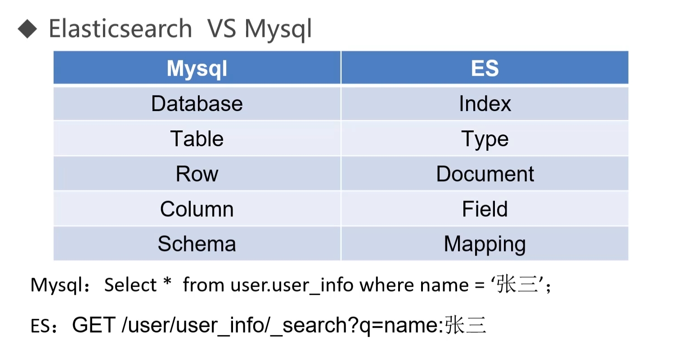
ES与MySQL关系对照表

ES与MySQL关系对照表

1
2
should == or
must == and

新增索引

创建test索引
1
PUT test

索引中新增数据

索引中添加数据
1
2
3
4
5
6
7
8
9
10
11
12
13
PUT test/_doc/1
{
"name":"聂强",
"age":25,
"gener":"男"
}

PUT test/_doc/2
{
"name":"李四",
"age":26,
"gener":"男"
}

删除索引

删除索引test
1
DELETE test

删除id为1的数据

删除id为1的数据
1
DELETE test/_doc/1

修改索引

修改索引
1
2
3
4
5
6
PUT test/_doc/1
{
"name":"聂强",
"age":22,
"gener":"男"
}

查询所有索引

查看所有索引
1
GET _all

查询id为1的数据

查看所有索引
1
GET test/_doc/1

根据关键字查询

查看所有索引
1
GET test/_doc/_search?q=name:聂

高亮查询

高亮查询
1
2
3
4
5
6
7
8
9
10
11
12
13
14
15
16
17
18
19
20
21
22
POST test/_search
{
"query": {
"bool": {
"should": [
{
"match": {
"name": "李强"
}
}
]
}
},
"highlight": {
"fields": {
"name": {}
},
"pre_tags": "<font color='red'>",
"post_tags": "</font>",
"fragment_size": 10
}
}

评论